
Here you find some technical description of the setup for the piece “Temporanea. Aggregate”, as well as some Arduino code and a simple Max patch.
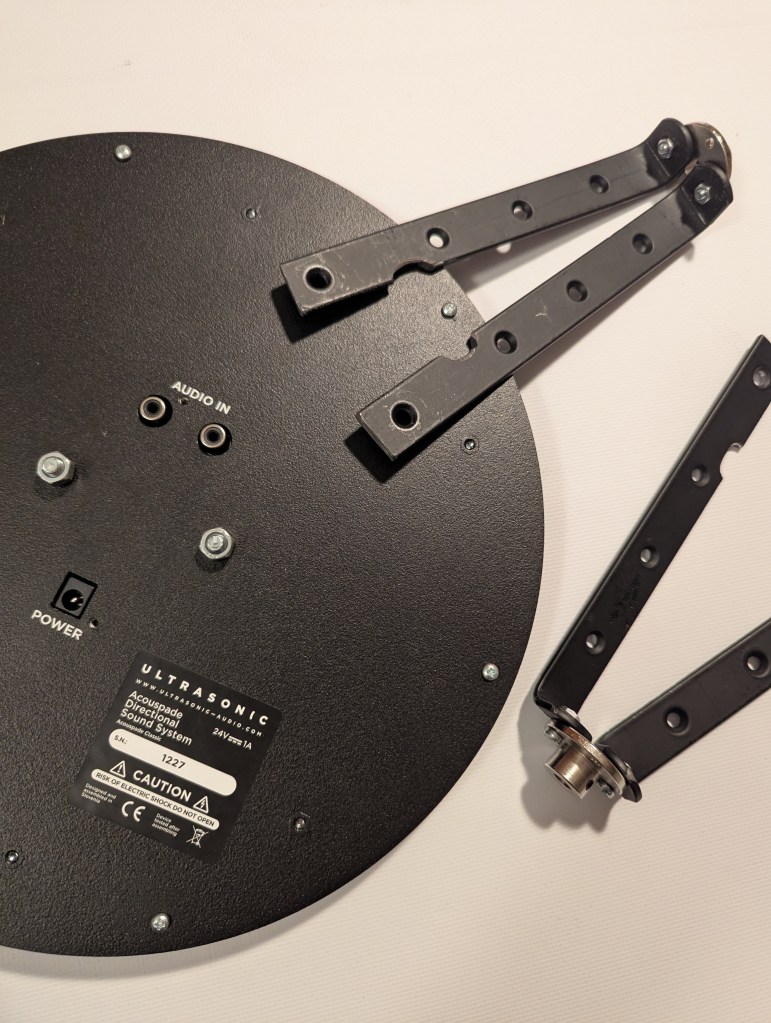
In the piece “Temporanea. Aggregate” (2023-24) I used Acouspade speakers, which emit a narrow, focused and directional sound beam, making the sound feel like it comes from near the listener’s head. This changes the way music is usually heard, providing a quite peculiar sound experience where each listener hears a mix of direct and reflected sounds.
The speakers also rotate during the performance, controlled by Arduino and stepper motors. This movement changes how the sound interacts with the space, making the composition adapt to the acoustics of the venue.
To control the movement of the directional speakers, I designed a custom mounting system that allows smooth and continuous rotation.
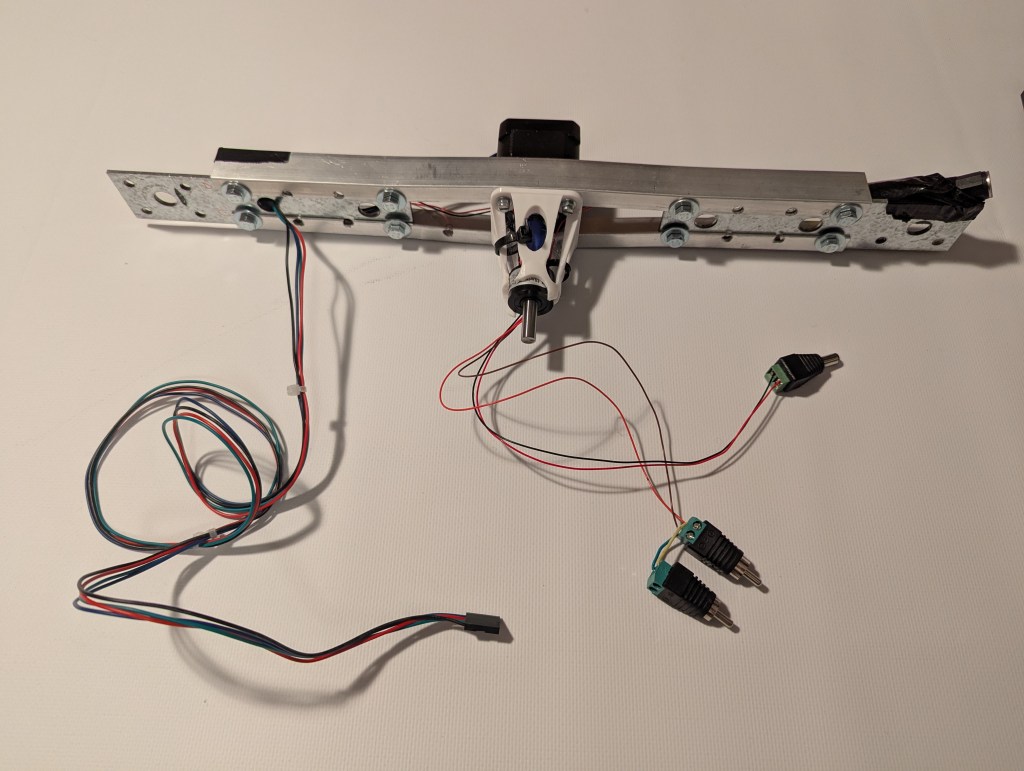
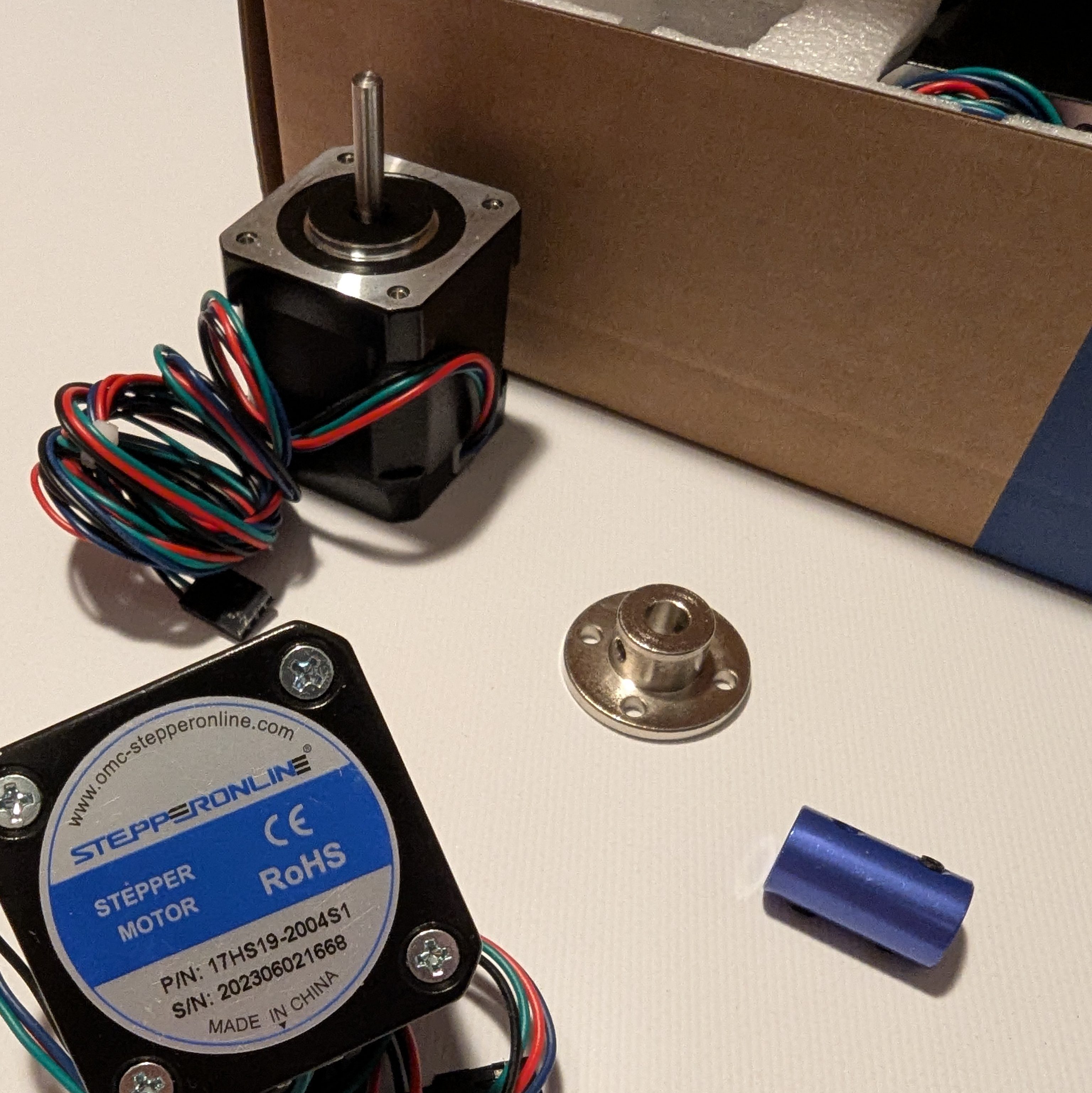
The speakers are attached to stepper motors (bipolar Nema 17 steppers, 59 Ncm) using a combination of modified metal parts, a custom-made 3D-printed model, and slip rings. The slip rings ensure that the speakers can rotate freely without twisting the connecting cables.
Finding the right stepper motor driver was quite challenging. Initially, I tested several drivers, including the TB6600, which worked well but generated excessive noise and heat. After experimenting with multiple configurations, I opted for the TMC2209 driver due to its silent operation and efficient current control.
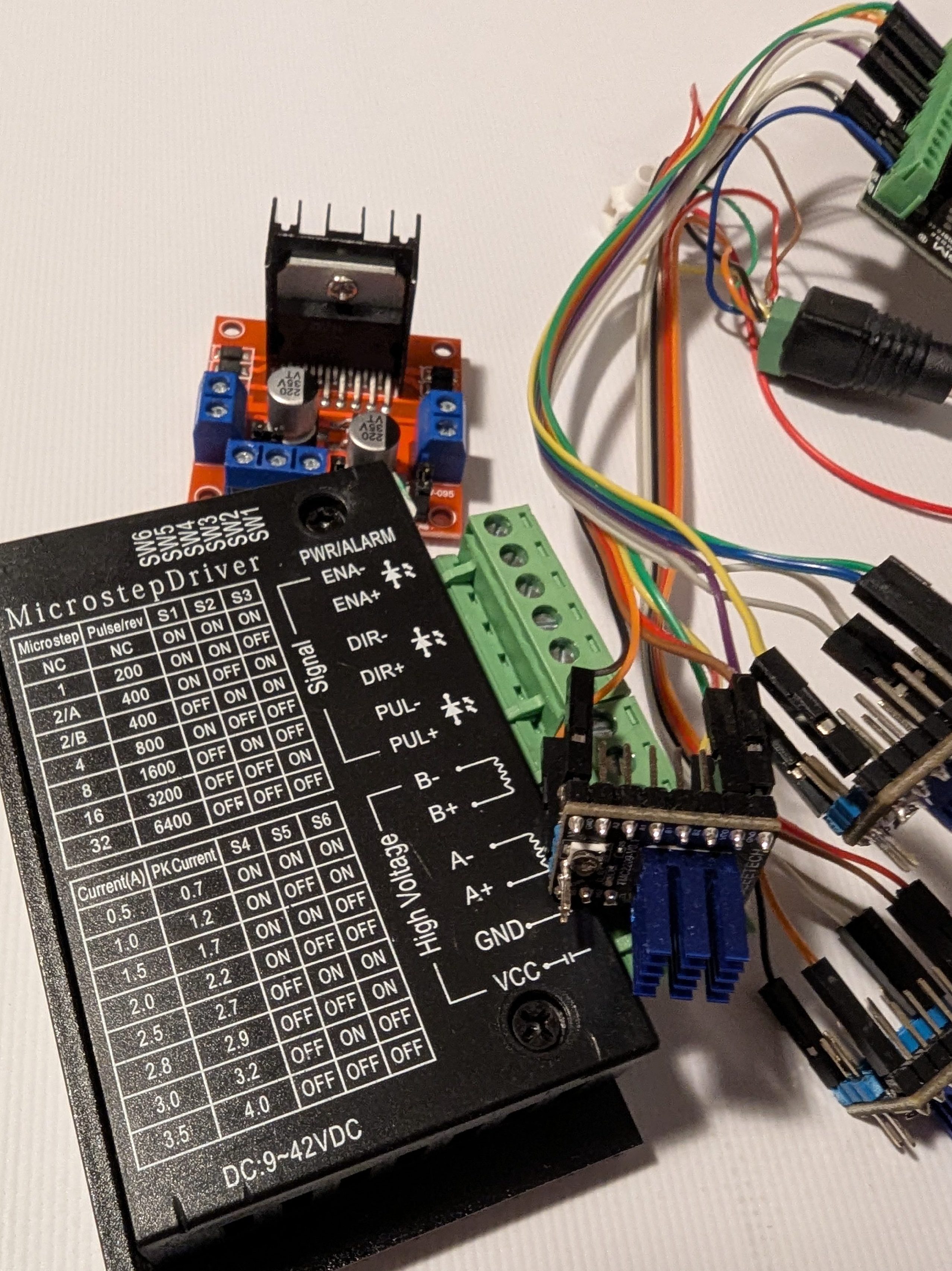
However, synchronizing multiple motors with the TMC2209 presented another issue: adjusting the speed of one motor could interfere with the movement of the others, leading to skipped steps and desynchronization. Careful programming was necessary to coordinate the motion of all three speakers smoothly.
The movement of the Acouspade speakers is synchronized with the musician’s performance through a control system using REAPER, Max/MSP and Arduino hardware. The REAPER session looks like this:
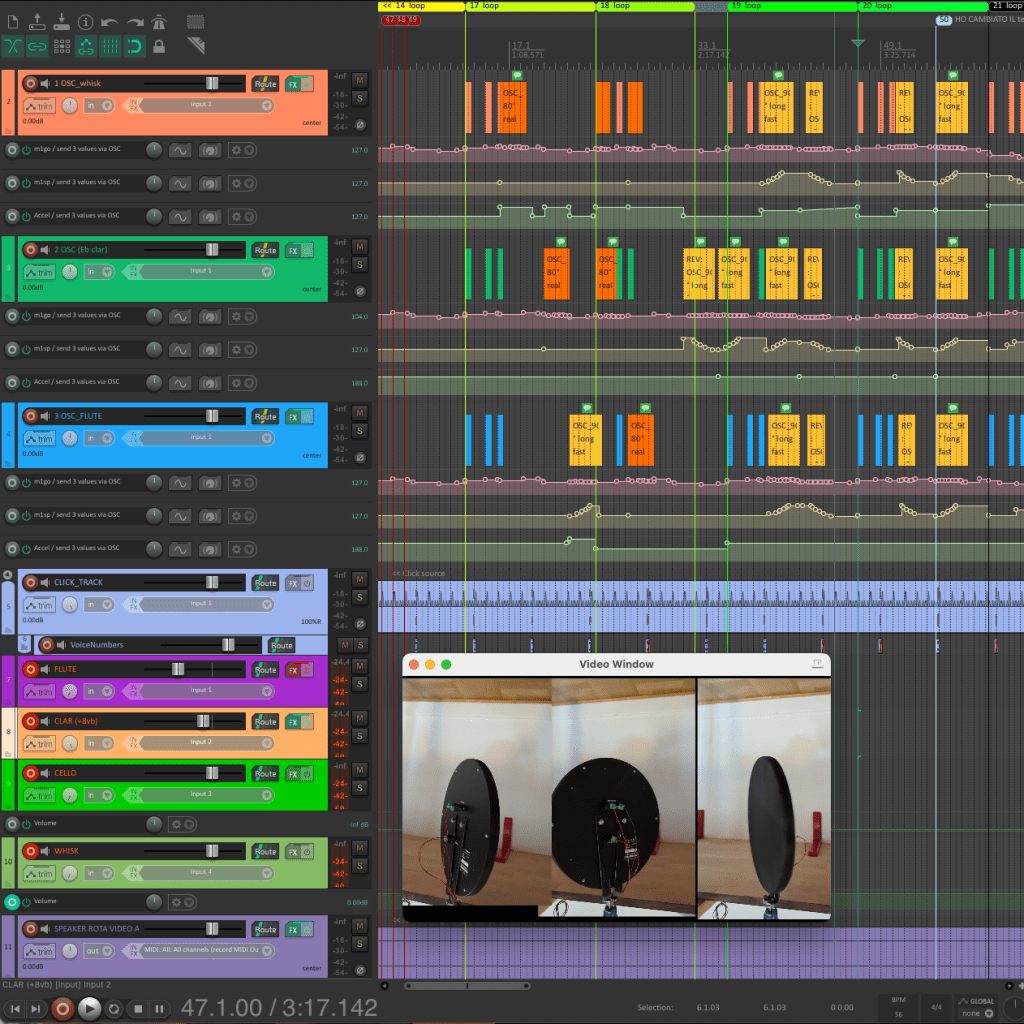
The control data for each speaker is embedded at the top of the REAPER session, where three tracks—one for each speaker—send OSC messages to a Max patch. A very simple custom plugin sending three OSC values was loaded as a track FX:
  desc:send 3 values via OSC


  slider1:m1go=126<0,253,1>m1go
  slider2:m1sp=126<0,253,1>m1sp
  slider3:Accel=126<0,253,1>Accel
As the JSFX documentation explains, these commands are used to define the name of the effect which will be displayed to the user (desc) and to specify parameters that the user can control using standard UI controls (slider).
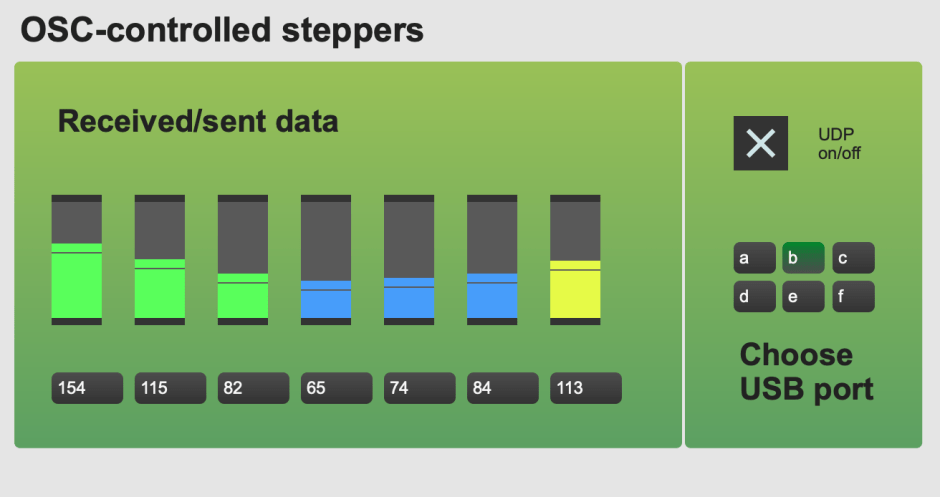
The simple Max patch (see below for code) processes the data incoming from REAPER and transmits it via serial communication to an Arduino board, which then drives the TMC2209 stepper motor controllers.
Each loudspeaker is associated with a specific instrument: one amplifies the cello, a second one amplifies the clarinet and a third one the flute.
Three parameters control the speakers’ movement: target position, speed, and acceleration. The acceleration value is shared among all three speakers and updates globally whenever it is modified.
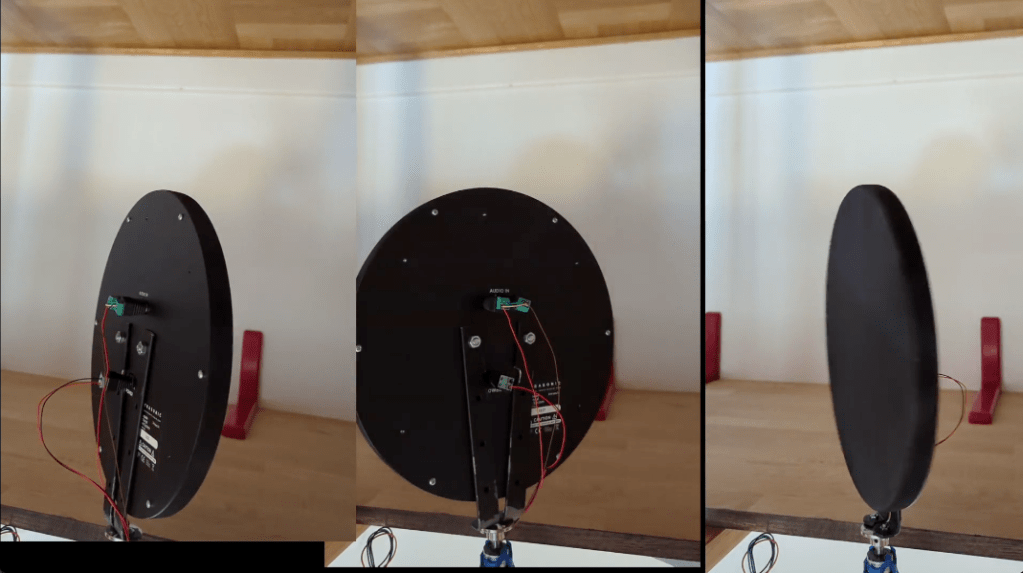
To design the rotational movement, I first created a reference choreography in studio, using only one speaker for a matter of convenience. I recorded three separate video takes, each showing the motion of the speaker as assigned to one of the three instruments.
These three videos were then combined into a single frame to visualize the overall speaker choreography. This composite video served as a guide for composing the music, ensuring that the instrumental writing responded to the timing of the predetermined movement patterns of the speakers.
Further down in the REAPER session, a click track provides synchronization for the three musicians, and additional tracks are used for amplification. Notably, the clarinet features a live electronics component: a transpose effect that harmonizes its sound by adding a lower octave.
The Max patch processes the OSC data from REAPER and sends it to an Arduino UNO board. The microcontroller feeds the TMC2209 drivers and ultimately make the speakers rotate.
The Arduino code provided at the bottom of the page, which you can copy and modify for your purposes (sorry it’s not too clean), makes use of the AccelStepper.h library. This library allowed me to dynamically modify the three key parameters for each motor: the target position to reach, a speed parameter, and the global acceleration variable (globalAccel).
Variable Initialization:
The code starts by defining several byte variables to store the target positions and speeds for three stepper motors: m1go, m1sp, m2go, m2sp, m3go, m3sp and globalAccel. The globalAccel variable controls acceleration for all motors, ensuring uniform acceleration.
OLDm1go, OLDm1sp, OLDm2go and so on are used to track the previous values of position and speed for each motor, helping to avoid unnecessary updates.
Pin Configuration:
The motor control pins are declared as constants (dir1, step1, en1, etc.), corresponding to direction, step, and enable pins for each motor. The pins are connected to the corresponding input pin on the TMC2209 drivers:
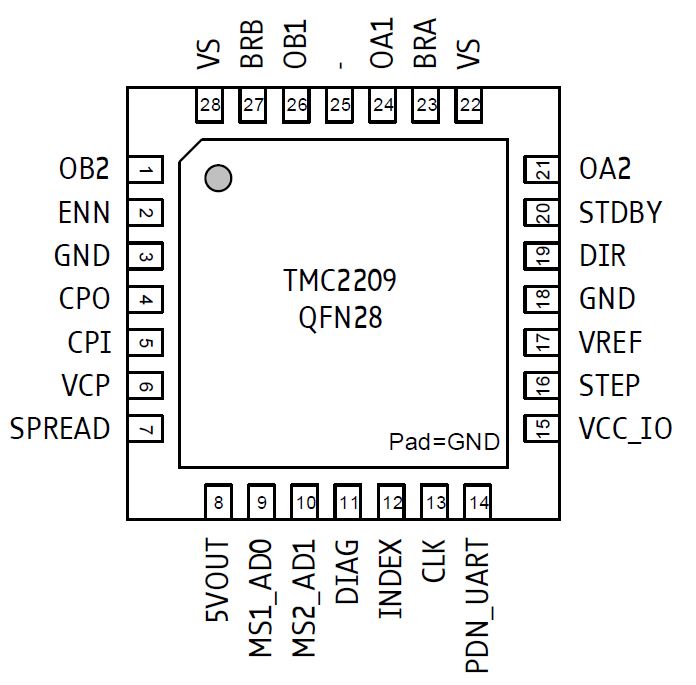
The motors are instantiated using the AccelStepper class:
AccelStepper stepper1 = AccelStepper(motorInterfaceType, step1, dir1);
AccelStepper stepper2 = AccelStepper(motorInterfaceType, step2, dir2);
AccelStepper stepper3 = AccelStepper(motorInterfaceType, step3, dir3);
Setup Function:
The maximum speed for each motor is initialized to 500 using setMaxSpeed(), while acceleration is also initialized to 500 using setAcceleration(). The maximum speed parameter is set because the actual speed of the motor in a certain moment is calculated based on the acceleration and on the destination value entered. The time it takes fort he motor to reach a new position is determined by tose two parameters, and by the maximum speed allowed.
The motors are initially moved to position 0.
stepper1.setMaxSpeed(500);
stepper2.setMaxSpeed(500);     //Values above 2000 fuck up a bit the movement
stepper3.setMaxSpeed(500);

stepper1.setAcceleration(500);
stepper2.setAcceleration(500);   // 1500 is a quite responsive accel
stepper3.setAcceleration(500);

stepper1.moveTo(0);
stepper2.moveTo(0);
stepper3.moveTo(0);
The pinMode() function sets the defined pins as OUTPUT, ensuring proper control of stepper motor signals.
digitalWrite() is used to initialize all step and enable pins to LOW (allowing the motors to move for the initialization position). The enable pin can be used to enable or disable the motor. Counterintuitively, when the enable pin is driven to a LOW level, the driver is enabled, and when it is driven to a HIGH level, the driver is disabled, causing the power stage to switch off and all motor outputs to float. Later on, the enable pins will only be activated when the motor must move. This way, no current will be used to force the stepper in a steady position and less heat will need to be dissipated, keeping the driver cool:
stepper1.run();
if (stepper1.isRunning() == false) {
  digitalWrite(en1, HIGH);
} else digitalWrite(en1, LOW);
Basically, if a motor is not running (stepperX.isRunning() == false), its enable pin is set to HIGH, reducing power consumption.
Further on, serial communication is established at 38400 baud to enable data transfer between Max and Arduino: the same rate is set in the Max patch: Serial.begin(38400);
Loop Function:
The function recvWithStartEndMarkers() continuously listens for incoming data over the serial port (“receive with start and end markers”). Receive and end markers are byte values 255 and 254, which are used to signal the start and the end of a list of seven values (nine values if we include the two markers). This is a safety net to ensure Arduino is always assigning the right value to the right variable. Basically, the lists Arduino receives are always:
255 m1go m2go m3go m1sp m2sp m3sp globalAccel 254There is probably a better way to do this but time flies when you are in a hurry and this was an effective way to accomplish what I wanted, so please don’t bully me.
When new data is received, the program checks if the new position values differ from the old ones:
if (m1go != OLDm1go) {
  pos1 = map(m1go, 0, 254, -6400, 6400);
  stepper1.moveTo(pos1);
  OLDm1go = m1go;
If so, the map() function remaps the 8-bit (0-254) values to a position range of -6400 to 6400, allowing for eight full tuns of the motor. Actually, 254 would be an ending marker so it’s a value that is never used as a control value for the motor position in the OSC envelopes of the REAPER session.
stepperX.moveTo(posX) updates the target position (where x is the motor number, 1, 2 or 3).
The run() method of each stepper motor executes movement based on the updated parameters. The driver calculates the movement and the motor moves step after step.
The motor speeds are updated based on m1sp, m2sp, and m3sp, but using a scaling factor of 7.11 and adding an offset of 50.
A commented-out section in showNewData() allows debugging via the Serial Monitor:
/* DEBUG via SERIAL MONITOR
    Serial.print(" m1go ");
    Serial.print(m1go);
    Serial.print("\t");
    Serial.print(" m1sp ");
    Serial.print(m1sp);
    Serial.print("\t");
    Serial.print(" m2go ");
    Serial.print(m2go);
    Serial.print("\t");
    Serial.print(" m2sp ");
    Serial.print(m2sp);
    Serial.print("\t");
    Serial.print(" m3go ");
    Serial.print(m3go);
    Serial.print("\t");
    Serial.print(" m3sp ");
    Serial.print(m3sp);
    Serial.print("\t");
    Serial.print(" globalAccel ");
    Serial.println(globalAccel);
*/
Here is the compressed code for the Max patch, copy and paste in a blank patch to see it:
<pre><code>----------begin_max5_patcher----------2783.3oc6bkzaiajE9r8uBBcbfibsuL2ljfbXtLASPNEDXPIQYyzTjBTT83dBx+8o1zpIEKtIQYLtArZQWju58deu0pJ9mO9vjYYuGsYRveO32Bd3g+7wGdvbI8Edv88GlrJ784IgaLCaxrsEEYoSdx9mVGVL+s3zWeIOZdg8wfHxozmBfRyGHIbJv8Qvu6tqzsqhSShJLOQn6hwKLO+rY+w2IgGd94gqhJhxeIJMbVRjdHfCOkrsEm+XrWp3aqirSmIyBSecRvuq+q+0iOp+0SdxpoQ+G0rY2ToH58B6LbZthHQAOWjGN+KOied46OCU+xLWUe8qgIaitf.BhwbsLghXFQC.X9.0.Aj.MoTg.pJgvjmBl7SaSR9Y0LNpXHEGjlKN3FA.kBZq3fKFOhi+V.X5E4VpPaWv3BqcgwHoRlE8QlEBlzLCfkIYgWUdTfoZdiHPsjE4rqGKtJZylvWi9.OBlRAP4gYRRbZz7rsoEGOmKSACoXMCyIVTs42ZAh2bOF2Ptebv3RFVypbDts7M5tjuEVVkI4sjuQfqBeOOa0pHE2bNeCCN8GzYeeOZbcdzF0CHrHNK8kxkNGOhCRHrDMUvU1DBgww.DYbLfwGIjVlkVjpB0alR+i73vjfuOKYwE7xbzS0H4gB3THR6pAzjPGkK6AkvQlmP+4DU4xZgI2jpYQNwjgf1ihFZIZbfQ3jabtR0EMjfMNKwVfQKBUfI27ngKyyVs4aqlkkbQNEvMbpM1HG1XcIleUbSnd3yhxuXFLBflSHriBv0HNgfad58WLUtA.1hT1bdnNIXqye5kEBk.bY7aNv8xYti7HycKD.CvsNycx8Sl6tD6nDRK8UIjWOUdUQ6+0e7mCxReNa4xKmmSai0yflxaT9y0E4P9Pb9xRfBXbF5ZXPI2SsfH5vGDuH60WShlbYlmxLHDgwb.K186Kw76Bwaydrj6oVmocnWIePvTEPLNseM0dMrHp97dvtPlnF6bEytNwJ6RBAXnUkaifzhDBfhQRBAHogEHTZKSH.Ju+SHvoNIHZKSH.AG4ID.qOg.jxvUGUjKaaBAnQTmM8yNFPsJdIok1wH7HwNF3Rl0FEpE1wHx8ucrScREx1ZGSuSpHEZix1AfKaj.bgPmxpsUjh32+.Wm5rC.WwXK.DtwUjBjFeWDHs0Afji1kVC233wNmYXQqWoQL3dKdL1B8cQwZiaswRe1rqTHmZpKtEd0neBxp1ICfl7JagSMHar4TC07EHWZpClJZ8BjC42YVwtN.3VB41TbLejXFys4lPI71VbL+9uc4N0I0VibaLi42Iqyyt89fUc2FfKajzVGAPzQfK69OqZm5rC.WFcjG.p9rp41EXmz9k4Axfi1rpQMMq5ccmlSZu3XDkU81EqU7VT7WiBj..3RLN01VOlwqlcEKZFeSusasIHDWyJ3PT1658TBhgpvqWIxEpDoyOSh7puYkse2po0uduNMsSbsIIdwQgBtrjA5ViJhgkOdW89kzrYyyRxxs2.XpD.kL.WPvPLGwdReIA.KQPJSvPbBUeIztAPIR.RQ.uD1td8PfGTW9udg31ujYah+ulQolsSAWG0SUnYAoFUFlyaNXVoD5FXlgF+f4cRlF.lOGlBlx1CiAJXMoT3MzKgcW.yrOGfYdsfYUcTMGLiYcDLStC.yNIyMGLiYcFLS+T.lOhMJWkoSgpwfYrnioYvXiev7NIysFL6D1cBLK9bjlApNUlptvFClQ7Nllg3d.L6jLM.LiImj0rAmpwu3iQzXYs3Wm7sK3WI5SA9EBqyaLjzhh9PvNlZg3NH0hcRlaA.F14rIDeNxl.RqK2XQKpyCx5X1DB73G+J32J3qS71I3K7tB9V0NN+e8K+v2MOKsHOKIIZQvlhn0qix2TilyAkmxUZBJkBHTAGRH5yYGnON7XpZlzmULM.4XJPE5yzQy2B5U0XSvQyv85jKnR5Q49+11T2EOqoPvhvhv5MVzK0NvtCNsRYXmjxJ6EiTlQJQJaOxW3l7dA.V0YetTwrxlCQQPjpx.0mLA8JHz+g2xx1DE7q+x2GrNKunyGcR2IJ.YgjP2RxQ6lVgZw9DYOoU.xQhVohU3Xc3WTLMM.bx+PGEVsD+2JG2lPG.p8vpJkWNBorDG37a5pcrrNWrXj8E0QUuIBJC6fXVwh8je0lWeA211CWkvp1i1izkJQSjVP2ISt8BK5nTXsvuyAUyjUDdGQVhQorZtmVgtsJhexJabf1Kptskd19CDO1JjHlD4YsX2rRuZGH9pvCqyiOj2PYcQ2tqBbwgIMeCmPtkG8MExYcT5hSS9oD8ncuCXgwbYy2HA218QvLeCVzDiZUF2ntEYsG2EAt+zq4gKhirYpta3yd8jBlMUGSw5ez+OnoL4SKO1cGn8Mr2Thsop588mGquD776aYbRh4deY2z6vTpjAY9MrQyryt4NMGOcUIZwCP4rwVbus7qRFv1hri0IkOp04YZ6OmZVQVYOh8C8L1eSf9XV2BmIGigy1DYJFaV.VPNrsp9X4Z0FK.iLNHcEfPNq1ukgyOuePWND3k24YGWqF7PiJJ8Dg+TakXqCSiR7pAPD6tokYO+JL4Tg..fDfDiobf7hfJ2IqGZeM6AsM5z7g+Gt98Kxzrr7EQ4mXg6ZE3tEUz3s4jlDZVKR7o+bpwumuuBbWeU1hni+dotKztG16BjcxhdB0yG94MxT2ySHjyHb.UHP3yVaT8yauWQ7gsyEkXt2iYWH0HDvGsbrFWfmzpzy7MQGH3CEqlH5XvVDDjQUSUZSwPHfaqUzEPDE7+AQWOPjYPlWpIm8ZM0nd0W+Tj0lrs4y24Ua2xdFbfVKh1TDmtWL9aGZsS.d+fL50p6ZU+RZkOo.3GIMnaj1CJqy5VOnNQHgOTReTT6Nk3dPI8qZ1iFTOIM8hz3xob2fP507zOzK51PZxPfdE9X3f5CLEzWwa+yidQZb4jtiZ1qkyAt3JoG0ulOqmkXz9fTDe7Ev6CJg8Ebx6aDhWjVeLG5e6BlvWtlz2bsWjlMHwqY9DggMHgX7hzD7PDWk4czMZuy09PZ1fDci4scMq24ZeHs9Dez+bMwm3cXVO32jbsBug8JsPxPXz5Oo6cEI1mXsmkA2dRiGdReVRG8k.2KRWgtFM7jV+hcoLRyFdRijkSZ5UfzU.yHCOog7gHhnejlUQUt7qAsq.nI5Fs8IbLjzGNs8I7.qOxe+LSxJraQCQEddQZzfjSGxqFB0Gw4QdktNcHhF3EoQChGBjWgekCBW6Mo68jNPdUovvnq8gzHxfnq8IccTezUCjOcbCOHcixKRCECh70mZRjnAAU4CogxAgq8gxfAgo8kx8t+CnWNrg8fkDzqFDJfCg70OZC4CRfeyqnMOHNoWDxWoFKC8pmfm0949Ra5Os6e6E+5OlXX3auJFfMHoWcdsUUQbQu.t7JM8gwgnWz9ba5dSC6CvFeyHMcPPVTruc.E1UfE8Z0BTHw+UFuaDBesHD5pI6fWMJ4ksdeTStOrD4ioYY2kOgqW+0n7MtQanwjUg+gc2UIdx703T6WMavwI4QeMd23sWILe9awEQyK1la2Tlu6dm+X1oT4oaic9PTbmhjaJ9Vx46rn86my+Y3prUgu7V7qJV+02JhV7RVdX5tcQqh8VFtMo3TQR374QoEGsovbm3XyKGMfaiOYY8mbh1b0MXlHFp5d3qTO43cdc1IgLaZN87ayZ29D0r25d7ud7+ATnyfmG-----------end_max5_patcher-----------</code></pre>
And here is the full Arduino sketch:
// www.alessandroperini.com
#include <AccelStepper.h>
bool motorInterfaceType = 1;
const byte numChars = 72;
char receivedChars[numChars];    //The size of the char datatype is at least 8 bits. It’s recommended to only use char for storing characters. For an unsigned, one-byte (8 bit) data type, use the byte data type.
byte m1go =127;
byte m1sp;
byte m2go =127;
byte m2sp;
byte m3go =127;
byte m3sp;
byte globalAccel;

byte OLDm1go =255;
byte OLDm1sp =255;
byte OLDm2go  =255;
byte OLDm2sp =255;
byte OLDm3go =255;
byte OLDm3sp =255;
byte OLDglobalAccel =255;

boolean newData = false;

int pos1;
int pos2;
int pos3;

const int dir1 = 11;
const int step1 =12;
const int en1 = 13; // Enable

const int dir2 = 6;
const int step2 = 7;
const int en2 = 8; // Enable

const int dir3 = 2;
const int step3 = 3;
const int en3 = 4; // Enable

//const int lowestMd = 3; // minimum microdelay

AccelStepper stepper1 = AccelStepper(motorInterfaceType, step1, dir1);
AccelStepper stepper2 = AccelStepper(motorInterfaceType, step2, dir2);
AccelStepper stepper3 = AccelStepper(motorInterfaceType, step3, dir3);

void setup() {

stepper1.setMaxSpeed(500);
stepper2.setMaxSpeed(500);     //Values above 2000 fuck up a bit the movement
stepper3.setMaxSpeed(500);

stepper1.setAcceleration(500);
stepper2.setAcceleration(500);   // 1500 is a quite responsive accel
stepper3.setAcceleration(500);

stepper1.moveTo(0);
stepper2.moveTo(0);
stepper3.moveTo(0);


  pinMode(step1, OUTPUT);
  pinMode(dir1, OUTPUT);
  pinMode(step2, OUTPUT);
  pinMode(dir2, OUTPUT);
  pinMode(step3, OUTPUT);
  pinMode(dir3, OUTPUT);
  pinMode(en1, OUTPUT);
  pinMode(en2, OUTPUT);
  pinMode(en3, OUTPUT);


  digitalWrite(step1, LOW);
  digitalWrite(step2, LOW);
  digitalWrite(step3, LOW);

  digitalWrite(en1, LOW);
  digitalWrite(en2, LOW);
  digitalWrite(en3, LOW);

  Serial.begin(38400);
  Serial.println("Serial initialized");
  Serial.println("Sketch running");

}
void loop() {
  recvWithStartEndMarkers();
if (m1go != OLDm1go) {
  pos1 = map(m1go, 0, 254, -6400, 6400);  //the range is remapped so that 8 full turns are achieved between 0 and 254
  stepper1.moveTo(pos1);
  OLDm1go = m1go;
}
stepper1.run();
if (stepper1.isRunning() == false) {
  digitalWrite(en1, HIGH);
} else digitalWrite(en1, LOW);


/////////////////////////////////////////////////


if (m2go != OLDm2go) {
  pos2 = map(m2go, 0, 254, -6400, 6400);  //the range is remapped so that 8 full turns are achieved between 0 and 254
  stepper2.moveTo(pos2);
  OLDm2go = m2go;
}
stepper2.run();
if (stepper2.isRunning() == false) {
  digitalWrite(en2, HIGH);
} else digitalWrite(en2, LOW);


////////////////////////////////////////////////


if (m3go != OLDm3go) {
  pos3 = map(m3go, 0, 254, -6400, 6400);  //the range is remapped so that 8 full turns are achieved between 0 and 254
  stepper3.moveTo(pos3);
  OLDm3go = m3go;
}
stepper3.run();
if (stepper3.isRunning() == false) {
  digitalWrite(en3, HIGH);
} else digitalWrite(en3, LOW);


  showNewData();

}


////////////////////////////////////////////////////////////////////////////////////////////


void recvWithStartEndMarkers() {        // RECEIVE THE BYTES, USING START AND END MARKERS
//Serial.println("reading port"); // for debugging, check if recWith... is executed
  static boolean recvInProgress = false;
  static byte ndx = 0;
  byte startMarker = 255;
  byte endMarker = 254;
  byte rc;
 //delay(3);    // MAY NEED DELAY IN BETWEEN READINGS
  //
  while (Serial.available() > 0 && newData == false) {
    rc = Serial.read();


    if (recvInProgress == true) {
      if (rc != endMarker) {
        receivedChars[ndx] = rc;
        ndx++;
        if (ndx >= numChars) {
          ndx = numChars - 1;
        }
      }
      else {
        receivedChars[ndx] = '\0'; // terminate the string
        recvInProgress = false;
        ndx = 0;
        newData = true;
      }
    }
    else if (rc == startMarker) {
      recvInProgress = true;
    }
  }
}

void showNewData() {
  if (newData == true) {
    m1go = (byte)receivedChars[0];
    m2go = (byte)receivedChars[1];
    m3go = (byte)receivedChars[2];
    m1sp = (byte)receivedChars[3];
    m2sp = (byte)receivedChars[4];
    m3sp = (byte)receivedChars[5];
    globalAccel = (byte)receivedChars[6];
/* DEBUG via SERIAL MONITOR
    Serial.print(" m1go ");
    Serial.print(m1go);
    Serial.print("\t");
    Serial.print(" m1sp ");
    Serial.print(m1sp);
    Serial.print("\t");
    Serial.print(" m2go ");
    Serial.print(m2go);
    Serial.print("\t");
    Serial.print(" m2sp ");
    Serial.print(m2sp);
    Serial.print("\t");
    Serial.print(" m3go ");
    Serial.print(m3go);
    Serial.print("\t");
    Serial.print(" m3sp ");
    Serial.print(m3sp);
    Serial.print("\t");
    Serial.print(" globalAccel ");
    Serial.println(globalAccel);
*/
if (m1sp != OLDm1sp){
  stepper1.setMaxSpeed(m1sp*7.11+50);
  OLDm1sp = m1sp;}

if (m2sp != OLDm2sp){
 stepper2.setMaxSpeed(m2sp*7.11+50);
  OLDm2sp = m2sp;}

if (m3sp != OLDm3sp){
stepper3.setMaxSpeed(m3sp*7.11+50);
OLDm3sp = m3sp;}


 //accel is remapped between 50 and 1850
if (globalAccel != OLDglobalAccel){

stepper1.setAcceleration(globalAccel*7.11+50);
stepper2.setAcceleration(globalAccel*7.11+50);     //Values above 2000 fuck up a bit the movement
stepper3.setAcceleration(globalAccel*7.11+50);
OLDglobalAccel == globalAccel;}


    newData = false;
  }
}
 Alessandro Perini
Pingback: Temporanea. Aggregate | Alessandro Perini